Many online users prefer browsing short videos without installing heavy software. Device storage fills up fast, and constant updates can slow down performance. When analyzing user behavior, a common question arises: can you watch TikTok without the app? The answer is yes. Accessing content without creating an account or signing up is entirely possible. Learning how to watch TikTok without app for free takes less than a minute on any device with quick tips from TokBoostly.
Understanding these platform alternatives helps digital brands capture broader audiences. Many viewers avoid official applications due to data tracking or battery drain. Luckily, the web version delivers a stable and clean video layout. Whether using a computer or a smartphone, viewing public clips is simple and restriction-free.
Can You Access TikTok Via a Browser?
The safest way to explore public content is through a standard web browser. Users often assume that mobile applications are mandatory for viewing media. However, the desktop web platform has become highly advanced. Anyone looking for how to open TikTok without downloading can simply utilize a basic browser.
Opening Google Chrome, Safari, or Firefox grants instant access to trending content. Browsers allow guests to check popular hashtags, view view-counts, and read public comments. This method provides extra security. Web setups do not request permission to access device cameras, contacts, or microphones.
How to Watch TikTok Without App on Phone (Android & iPhone)
Mobile web browsing requires a specific approach to bypass constant download pop-ups. The platform frequently pushes app store redirects, but skipping these blocks is easy.
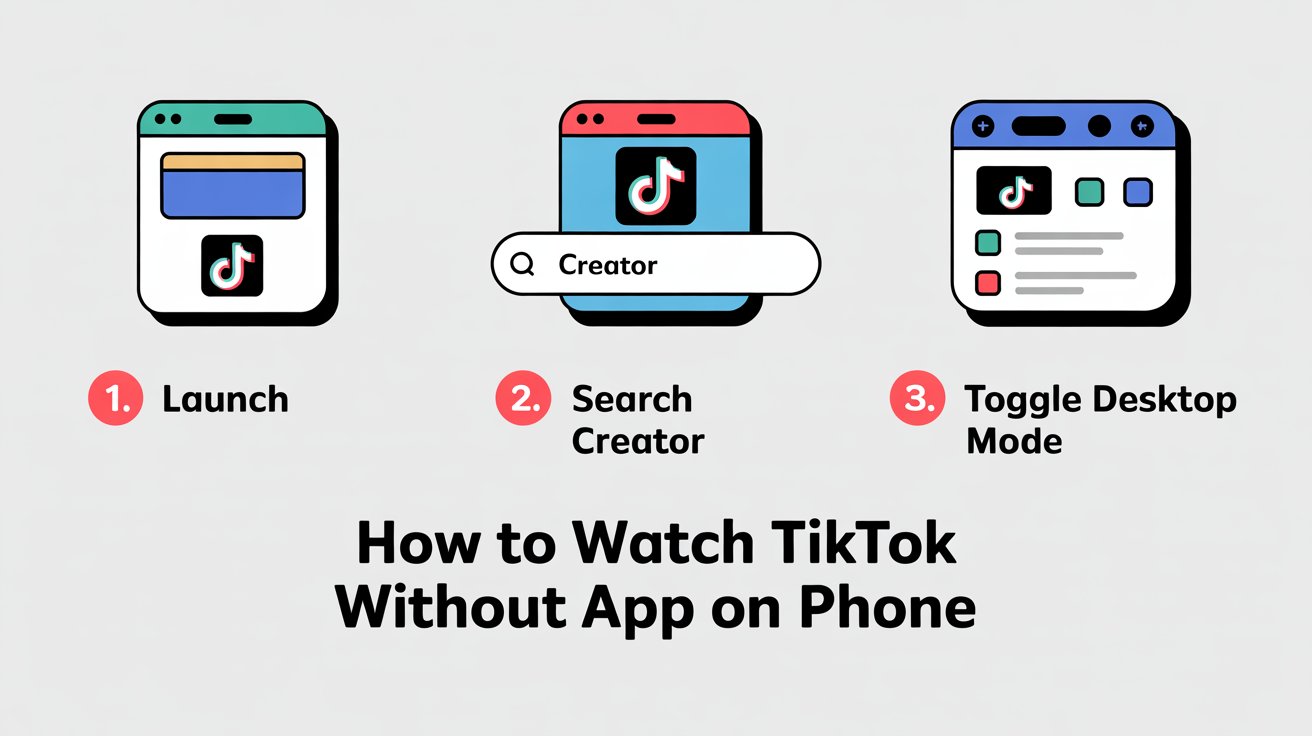
Step 1: Open the Mobile Browser
Launch Safari to watch TikTok without app iphone users prefer. Open Google Chrome to answer can I watch TikTok without the app on android devices.
Step 2: Use Search Shortcuts
Do not open the main landing homepage directly. Search Google for a specific creator handle or trending topic first. Clicking a direct link from search results usually loads the video player instantly.
Step 3: Activate Desktop Mode
If mobile redirects continue to block the screen, open the browser settings menu. Select the option to "Request Desktop Website." This switches the interface layout to a computer view, allowing users to watch TikTok videos online free without sudden stops.
How to View TikTok Content Privately Online
Browsing via web links offers an excellent way to watch TikTok anonymously. The official mobile app logs deep user history, device identifiers, and search habits for ad targeting. Visiting a profile while logged in can also alert the profile owner.
Using a private web browser eliminates tracking concerns. Opening an Incognito window ensures that no personal history connects to the viewing session. This allows users to watch without leaving digital footprints or appearing in creator notification logs.
Fix Common Errors When Watching TikTok on Browsers
Sometimes, attempting to watch without the official application causes sudden layout errors or loading glitches. Browsers can face temporary script blocks when handling heavy video formats. Understanding how to resolve these issues ensures smooth viewing on any device.
Clearing Cache and Cookies
If video thumbnails fail to appear, the mobile browser cache might be full. Go to browser settings, select privacy, and clear recent browsing data. This action refreshes the connection, allowing users to browse and watch tiktok without app iphone or Android platforms support smoothly.
Handling Video Playback Loops
A frequent issue is a video loop that forces an app store redirect. To counter this, avoid tapping the center play button on mobile interfaces. Instead, tap the progress bar at the bottom or let the video autoplay naturally. This bypasses the hidden download triggers embedded in the mobile layout.
Resolving Audio Mute Restrictions
Browsers often mute videos by default to save mobile data. If a clip plays without sound, look for a small speaker icon in the bottom corner of the video frame. Tapping this icon unmutes the media player instantly. This step answers common complaints from users wondering can i watch tiktok without the app on android with full audio features.
Pros and Cons of Web Browsing vs. TikTok App Usage
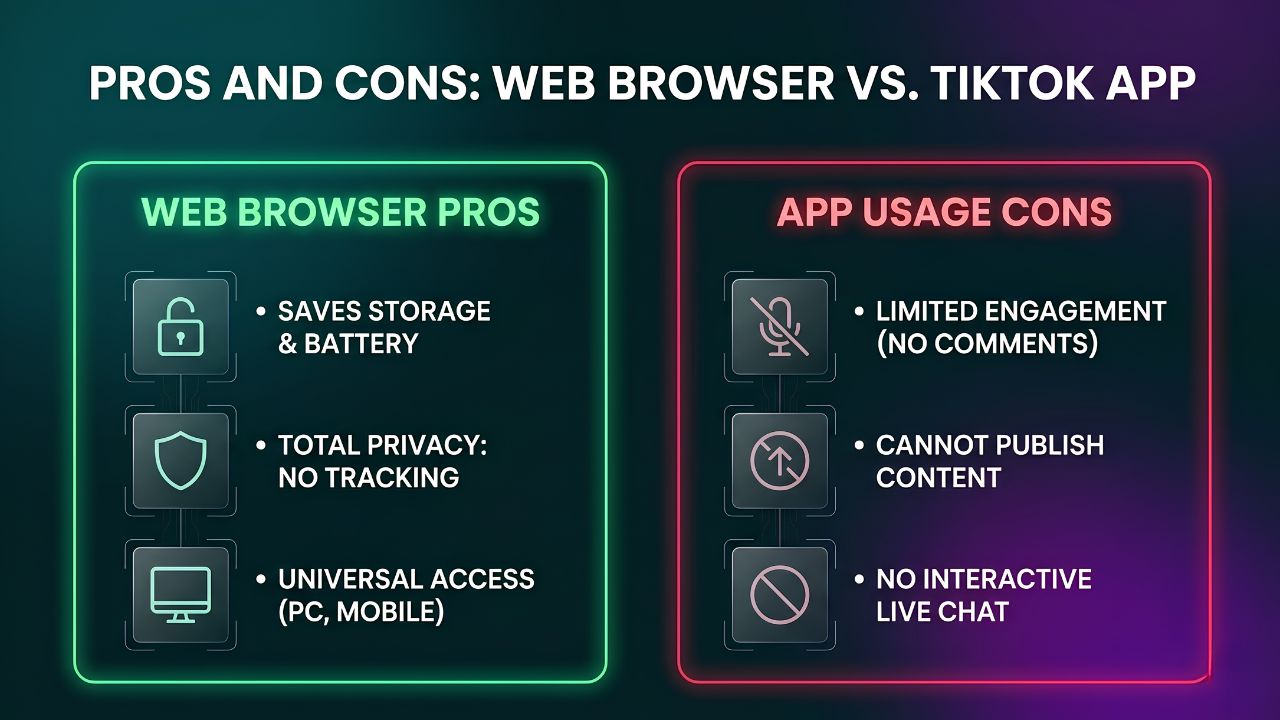
When choosing how to watch tiktok without app free methods, comparing the web experience against the official application helps set the right expectations. Both choices have specific benefits and limitations for daily viewers.
Pro – Total Privacy: Browsing via web links lets users watch tiktok anonymously without sharing location data, contact lists, or phone identifiers.
Pro – Device Health: Eliminating background app refreshes saves mobile battery and prevents local storage from filling up with temporary cache files.
Con – Limited Engagement: Guest accounts cannot leave comments, like video clips, or interact with creators during live broadcasts.
Con – No Direct Uploads: Publishing new content or editing drafts requires a registered profile on the official network.
Pro – Universal Access: Web versions solve the issue of how to watch tiktok without app on phone configurations, regardless of old operating systems.
Optimizing Profiles for Browser Traffic
Since millions of users browse content externally, profiles must stay fully optimized. Low reach or sudden view drops often happen when account health is weak. Businesses facing these visibility issues frequently use professional tiktok growth services to fix backend profile errors. Maintaining clean account health ensures that videos distribute properly across both apps and web browsers.
Frequently Asked Questions
How to use TikTok without a user?
Launch any desktop or mobile browser and open public video links directly. Guests can view trends and check profiles. However, leaving comments, liking videos, or following creators requires a registered account.
Do web views show up in profile history?
No. Viewing videos through a web browser without logging in keeps the session hidden. The action counts as a standard anonymous view, and no profile names are shared with the creator.
Is it possible to watch live streams on a browser?
Yes, public live streams are accessible via direct web profile links. However, interactive features like writing chat messages or sending virtual gifts are restricted for guest viewers.
Why do browser videos pause after a few seconds?
Mobile websites sometimes limit playback to encourage app store installations. Refreshing the webpage or enabling "Desktop Site" mode inside the browser settings fixes this playback issue instantly.
Final Thoughts
Navigating modern social platforms does not always require installing dedicated applications. Learning how to watch tiktok without app iphone or Android shortcuts gives everyday users total control over their privacy and device performance. By utilizing simple desktop view toggles and secure browser settings, anyone can access public video feeds safely and quickly.